Customer & Sale Panel
A decision-intelligence panel for B2B construction-materials trading — fusing a CRM, VoIP call center, segmentation and revenue intelligence into one action-first, explainable, RTL workspace.
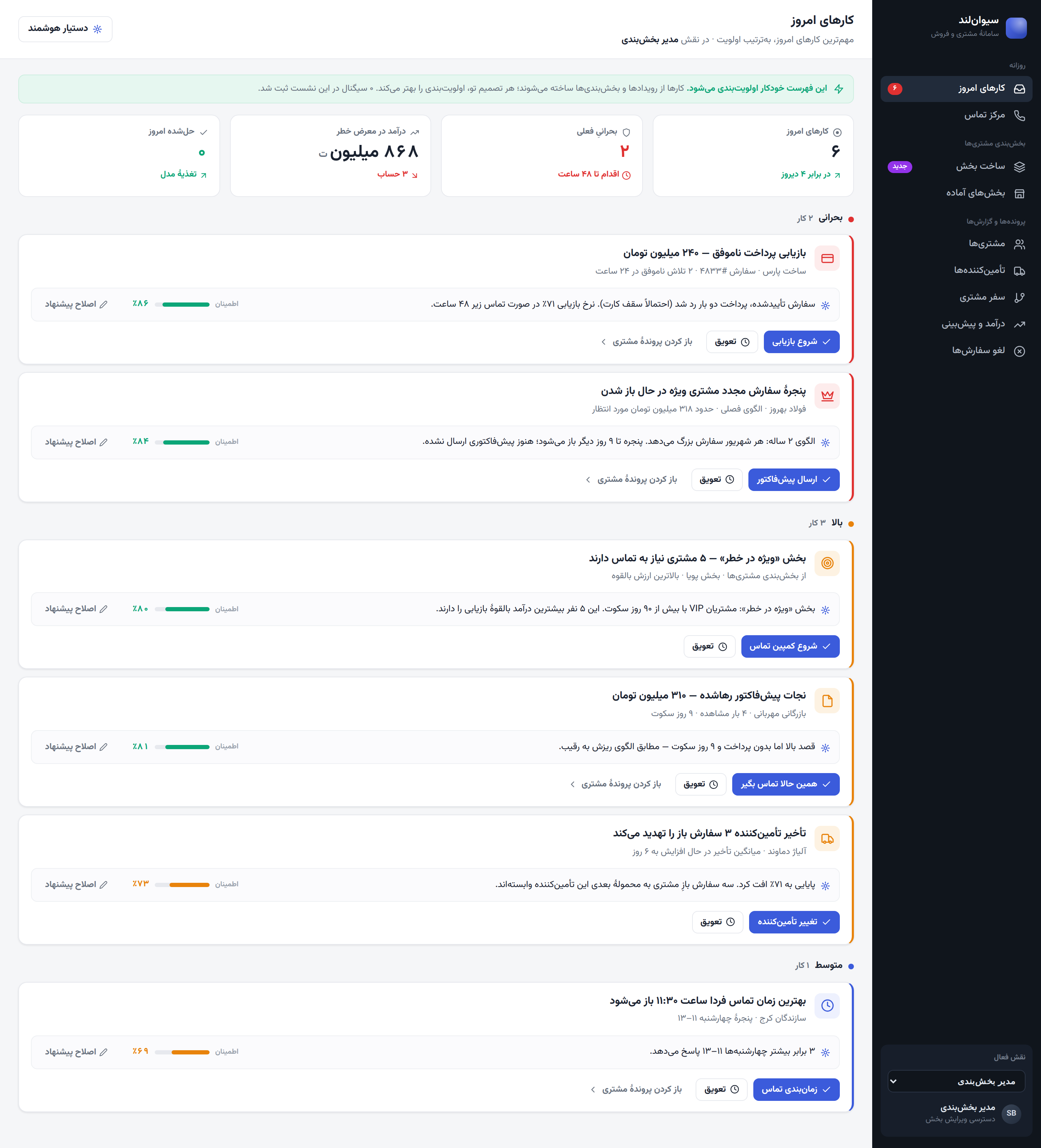
SivanLand is the internal panel for a company that buys and sells construction materials and steel in a fast, relationship-driven market, running on a “sell first, source later” model — deals are agreed on the phone, payment is collected, and goods are procured afterwards. The panel fuses a daily to-do queue, a VoIP call center, customer & supplier records, a sales funnel, revenue forecasting, customer segmentation and cancellation analytics into one coherent workspace: not a dashboard you stare at, but one that hands you the next decision, simple enough for a non-technical operator to use on day one.
The company didn't need “more software” — it already had an ERP and plenty of data. The pain was that the data and the daily work had drifted apart:
- Operators avoid manual data entry — typing notes into a CRM pays them nothing back in the moment, so they skip it, and every downstream report slowly rots.
- The customer journey is invisible — nobody can see where deals quietly die between first contact and repeat purchase.
- Procurement runs on gut feel — suppliers are chosen from memory, not delivery history, so avoidable delays keep hitting open orders.
- Work is scattered across phone, paper, spreadsheets and the ERP — context is lost in the gaps between them.
- “Smart” features feel like black boxes — when a tool can't explain why, operators ignore it.
The reframe: the software asks people to feed it without ever helping them back, so they stop feeding it — and the intelligence dies with the data. Every time the system asks for something, it must give something back immediately.
I talked through daily routines with sales and procurement staff, shadowed how an operator handles a live deal from first call to payment, reviewed the raw events the ERP already produces, and studied why operators abandon mainstream CRMs. Each insight became a design rule:
- Action-first — opens on what to do today, ranked by urgency, not a wall of charts.
- Timeline-first — each customer is a story of events read like a feed, not a grid of fields.
- Explainable AI — Reason · Confidence · Override — every recommendation shows why, how sure, and a one-tap way to correct it.
- Forms-last — typing is the exception; the system captures data from real events.
- Event-first — orders and payments belong to the ERP (System of Record); SivanLand consumes them as events and turns them into action (System of Action).
The panel is grouped into three plain-language areas — Daily, Customer Segmentation, Records & Reports — deliberately stripped of jargon. An early version used words like “Intelligence Hub” and “Studio”; against non-technical readers those names caused hesitation, so “Segment Studio” became “Build Segment”, “Customer 360” became “Customers”, and “Revenue Intelligence” became “Revenue & Forecast”. A menu label should say what a screen is, not how clever it is.
The daily flow — Today. The operator starts here: a queue pre-sorted into Critical / High / Medium, each card with a one-line reason to act, snooze or override.
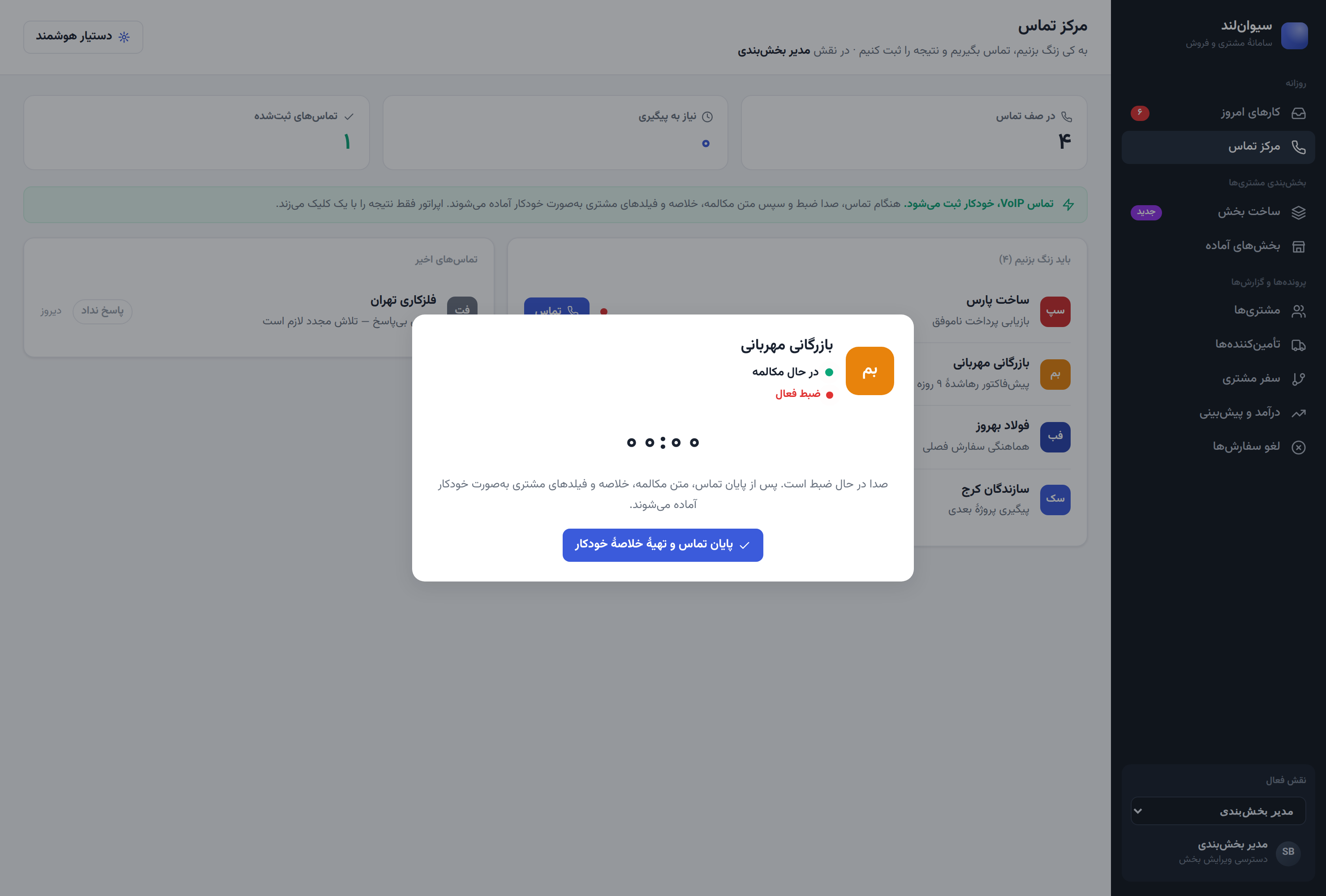
The VoIP call flow — the centerpiece. The operator clicks Call; the system does the rest. During the call the voice is recorded, and the moment it ends, the system transcribes the conversation, writes a short summary, and auto-fills the customer's fields (phone, interest, best time to call). The operator only taps an outcome — Interested, Needs follow-up, Bought, Cancel order — and the whole interaction drops into the customer's timeline as a recorded, summarised event. A job that used to be a five-minute form becomes: click, talk, tap.
Cancellation flow. A customer can only cancel before payment; after payment the option is disabled with a plain explanation, so the rule is obvious rather than a dead end.
From segment to action. Segmentation isn't a dead report — picking rules recomputes live metrics, and a segment can be sent straight to Today as an action card for the whole group.
- Today — four live tiles (today's actions, critical count, revenue at risk, resolved today) above a severity-sorted queue; completing a card animates it away and updates the tiles instantly.
- Call Center — call queues, an in-app VoIP dialer with ring/live/wrap states, auto transcript, AI summary with detected intent, auto-filled fields tagged “auto”, one-click outcomes, follow-up routing, and cancel-from-call.
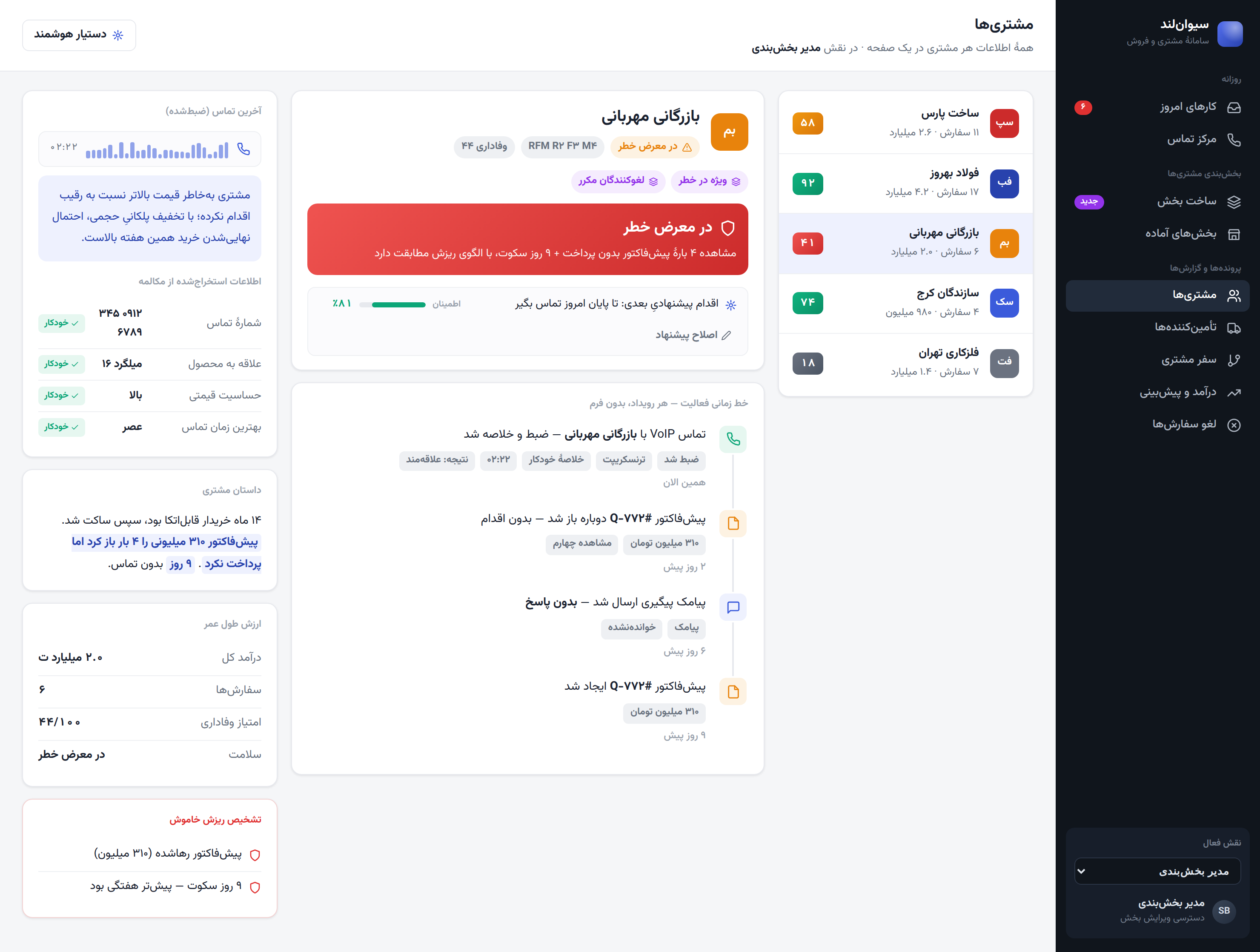
- Customers (360) — identity with segment + RFM chips, a colored health score with its reason, an activity timeline read as a feed, a plain-language “customer story”, and silent-churn flags.
- Suppliers (360) — reliability score, average delivery delay, purchase volume, and how a supplier's risk threatens open customer orders.
- Customer Journey — a seven-stage funnel from Lead to Loyal; the two biggest leaks (Quotation — price objections, and Payment — card friction) are exactly where the daily actions focus.
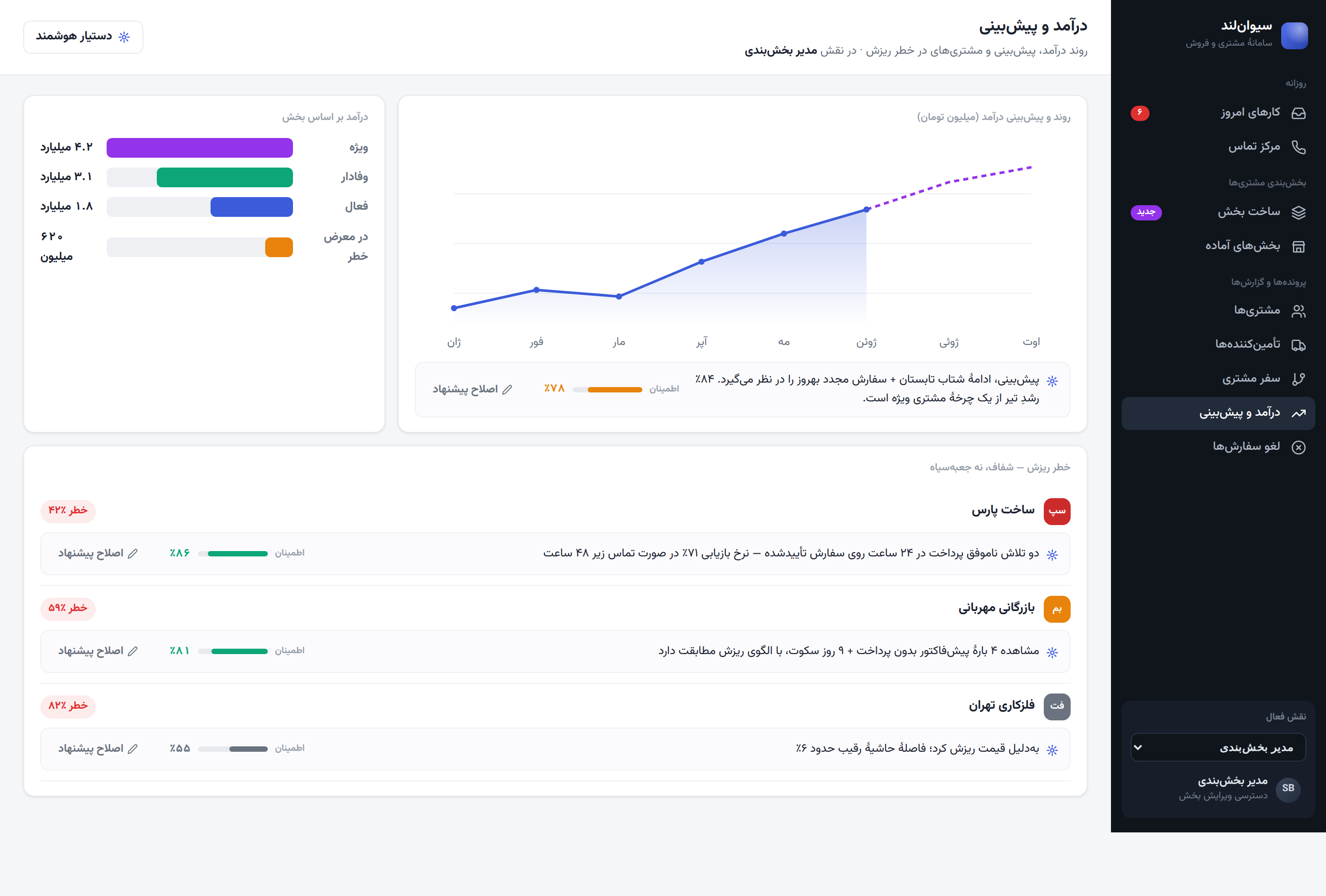
- Revenue & Forecast — a revenue trend with a forecast line, revenue by segment, and an at-risk-customers list, each with its own explainable reason.
- Build Segment — live segmentation across RFM, behavioral signals and customer-status rule families; population, revenue, potential, churn and growth recompute live as rules change, with an optional file upload for a target list.
- Ready-made Segments — eight prebuilt templates (Champions, VIP at risk, Repeat cancellers, SMS-responders…) that open inside Build Segment to edit or run.
- Order Cancellations — a queue of cancelled orders awaiting a reason, tied to its specific order in one click, feeding a live 90-day reason breakdown.
- Roles & Permissions — six roles (Admin, Segmentation Manager, Sales Manager, Procurement Manager, Finance Manager, Sales Operator), each seeing a clear read-only lock where they can't edit.
- Marketing connection — funnel leaks and RFM scores feed directly into targeted segments and campaigns, with responses tracked back onto the customer timeline.
This strip appears under every AI suggestion in the product: a plain-language reason, a confidence bar and percentage, and a one-tap override the operator can use to say “this is wrong” and pick why. Every override teaches the system — the human is never overruled by a black box, and the black box gets less black over time.
- Plain-language naming — no jargon in the menu.
- Forms-last + one-click outcomes — the lowest possible friction.
- Triple-coded status — color, icon and text together, so meaning never depends on color alone.
- Structural RTL Persian layout — true right-to-left, with Persian numerals throughout.
- Progressive disclosure — summaries first, detail tucked into toggles and the timeline.
- Honest empty & blocked states — a disabled “cancel” explains why instead of just failing.
Leading with actions and making every suggestion explainable changed the product from “a CRM you maintain” into “an assistant you trust.” Folding call capture, records, segmentation and cancellations into one flow removed the gaps where work used to leak.
Run moderated usability sessions on the call → outcome → timeline flow, test whether operators read confidence scores the way they're intended, and wire the VoIP call to a real telephony layer and speech-to-text/summarisation model.