Operations Console
Removing a daily finance bottleneck and protecting margin in a sell-first B2B construction-materials marketplace.
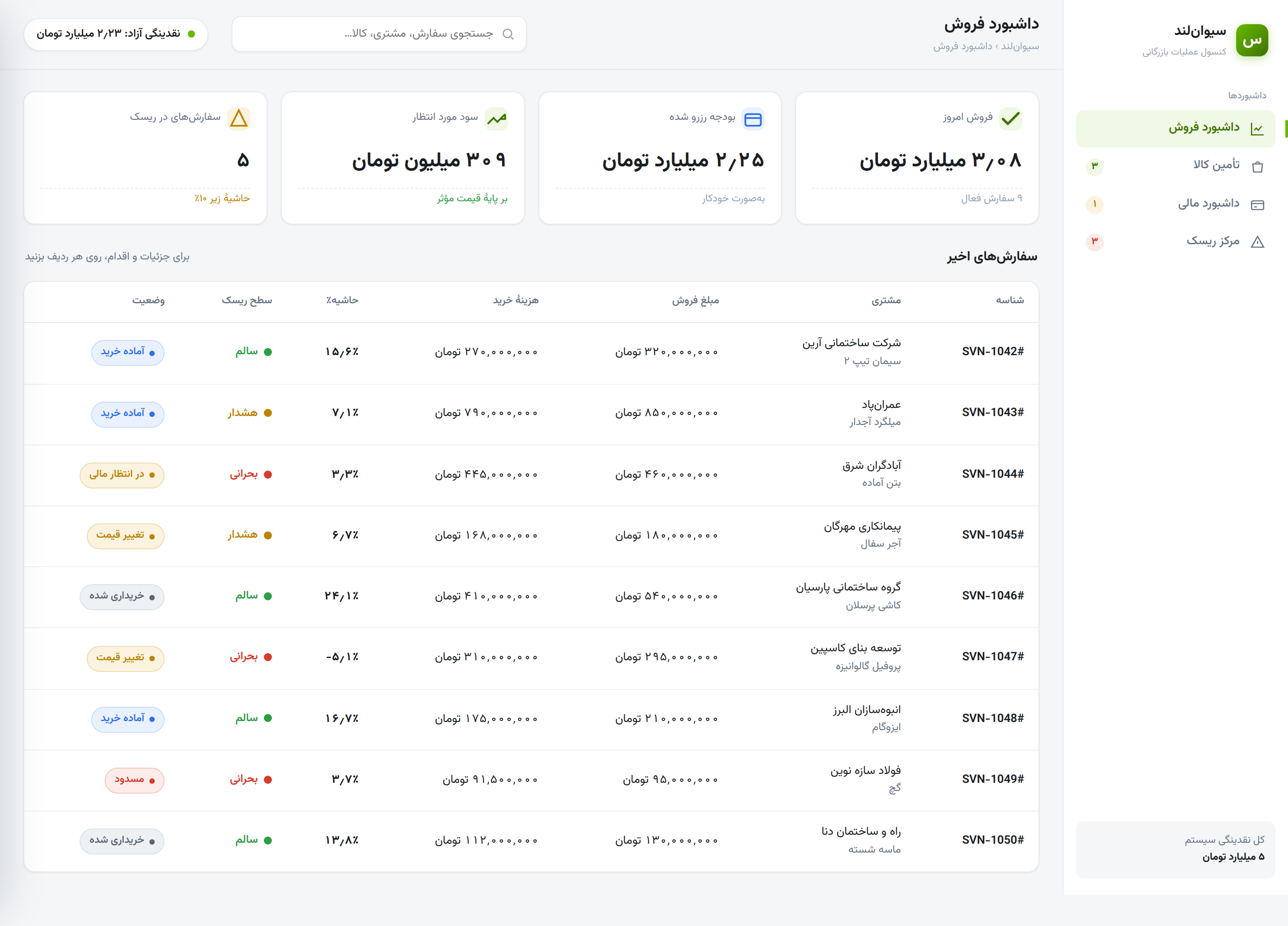
SivanLand is a B2B marketplace for construction materials — cement, rebar, ready-mix, tile, profiles — that runs on an unusual model: it sells first and sources second, taking customer payment before buying the goods to fulfil the order. I designed the internal Operations Console that runs this flow across the sales, procurement, finance and risk teams. The brief, in one line: “orders move too slowly, and we keep losing money on some of them.” The real work was turning that into two precise problems — and solving both at the point of decision.
Selling before buying keeps SivanLand asset-light, but it creates two structural risks that compound with volume:
- Operational — procurement had to confirm budget with finance before every purchase: a manual, repeated round-trip that idled every order.
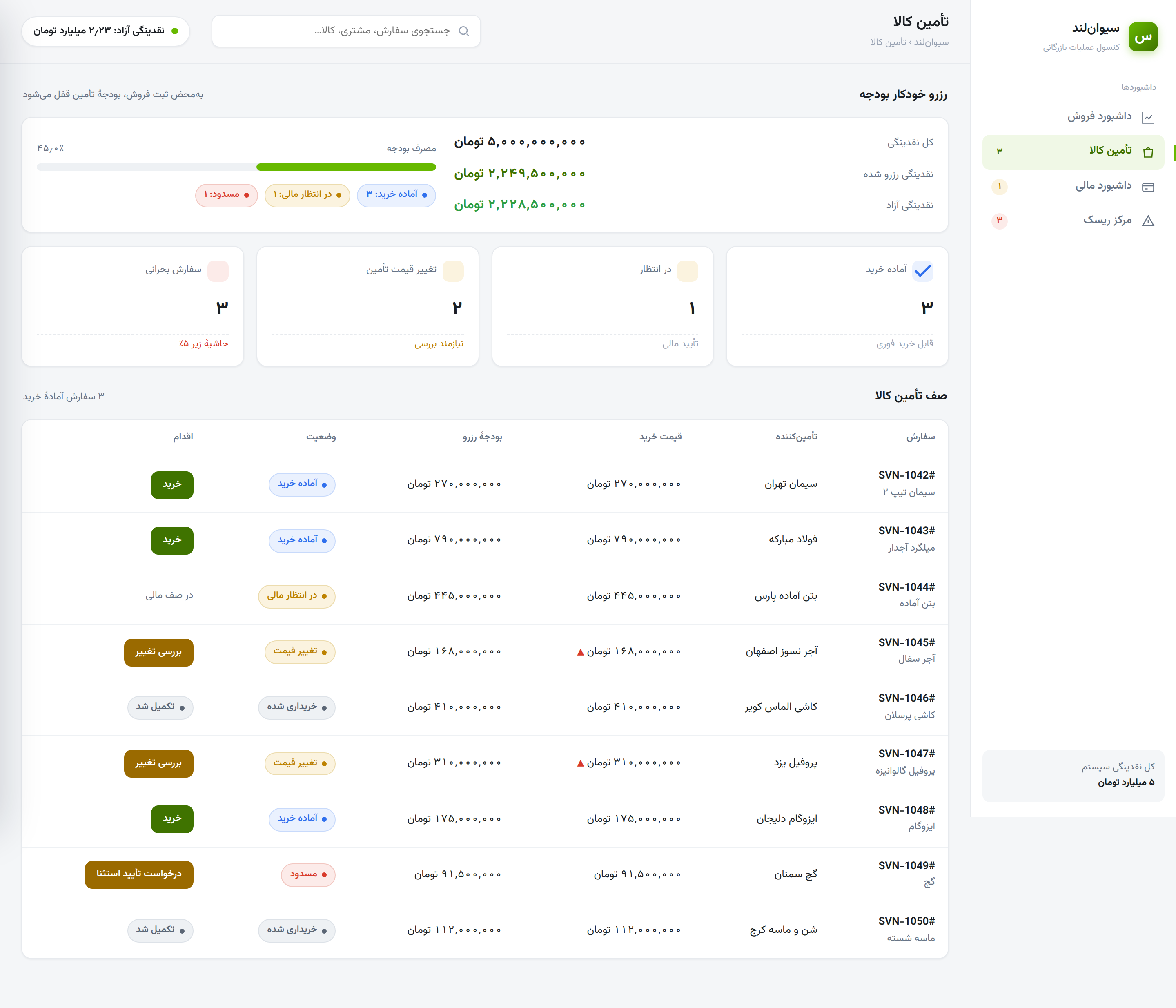
- Financial — the sale price is fixed at order time but the goods are bought later, so any rise in the supplier's price comes straight out of margin, sometimes turning a sold order into a loss.
The insight: both are the same disease — the information needed to decide isn't present at the moment of the decision.
Make the safe path the automatic path, and reserve human judgement for the orders that actually deserve it.
- Surface, don't fetch — available cash, reserved budget, live cost and margin are visible where the action happens, not in another department or tab.
- Automate the routine, escalate the exception — healthy, in-budget orders clear themselves; people are pulled in only when something is off.
The same colour logic drives the gate, the status chips and the risk views, so healthy / caution / critical means the same thing on every screen.
- Decision data lives in the order row — sale price, live cost, margin % and risk are visible on load, no drill-down needed.
- Colour encodes the margin policy — one semantic system, never decoration.
- Undo on every action — a 6-second Undo toast replaces anxious “Are you sure?” dialogs.
- Exceptions carry a recovery path — blocked and price-changed orders surface their next action.
- Global search + plain Persian labels — “request exception approval” instead of an English “Override”.
- WCAG-AA action colours — button colours darkened to ≥ 4.5:1 contrast.
High-fidelity screens from the prototype — Persian (RTL), built on the Sidera design system. The sales dashboard's four-tile summary strip (today's sales, reserved budget, expected profit, orders at risk) sits over the live order table; the procurement buy-queue shows the quantified loss and recovery action inline for any price-changed order.
As a prototype, these are the outcomes the design is built to produce — each tied to a metric so it can be validated, not assumed.
Moving financial truth earlier — reserving funds and locking price at the sale — turned two human bottlenecks into automatic checkpoints. Separating the routine path from the exception path kept the console calm and scannable.
Validate the riskiest assumption first with a one-week Wizard-of-Oz on the “available-to-commit” balance before building the ledger, then wire the screens to the live design-system components.